
1. Download the Chat App
In order to avoid the numerous issues that can arise when using encryption, we recommend using Element (https://element.io). Element is a secure open source chat client that can be used for the Bauhaus.Chat.
Download the Chat App for Desktop: Windows macOS Linux
Download the Chat App for Your Smartphone: Android iOS
2. Create an Account
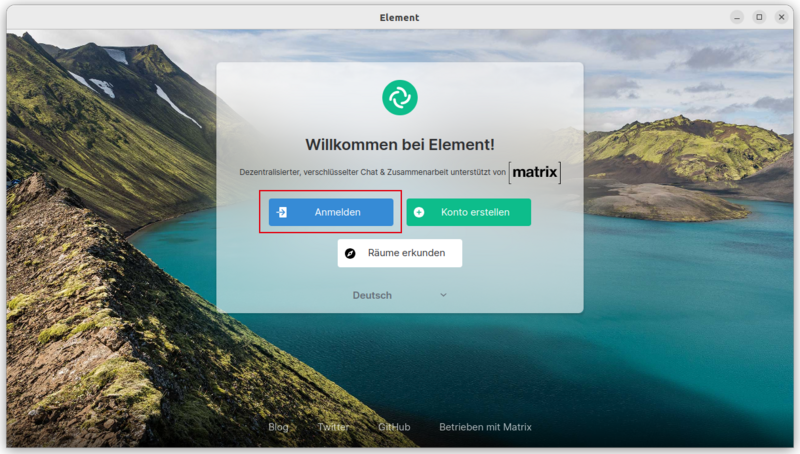
Step 1: Once you have opened Element, click on »Create Account«
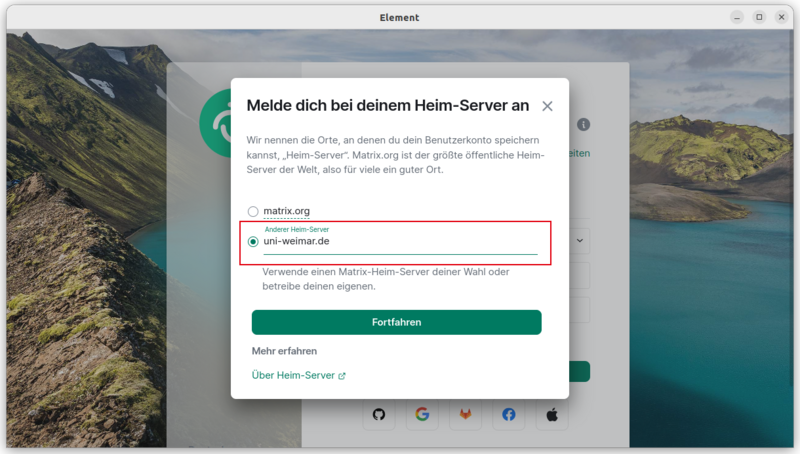
Step 2: Under »Edit« change the home server to »uni-weimar.de«
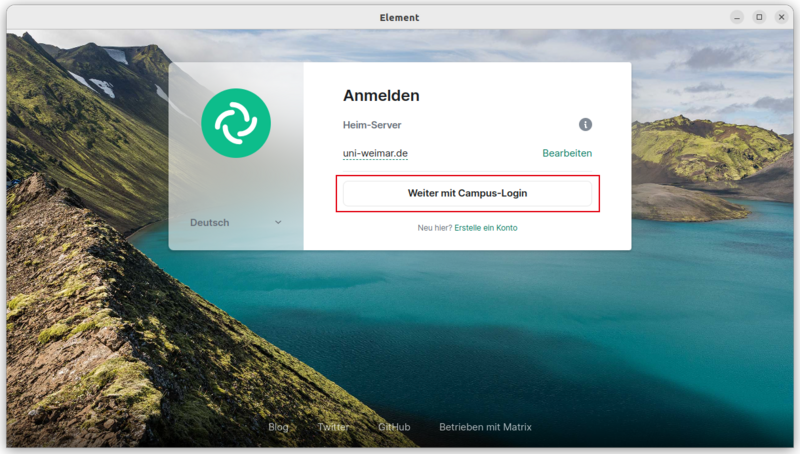
Step 3: Click on »Continue with Campus-Login« to start the registration process. This will open the central login page of the Bauhaus-Universität Weimar.

Please note:
It is not possible to register for an account here at the Bauhaus-Universität, as only people with an university login can use the service. The Bauhaus-Universität Weimar is not a communications service provider.
If you are engaged in scientific collaboration with colleagues who do not have a Bauhaus-Universität Weimar account, there is the option to request university guest accounts (available internally only) for these colleagues. Users of these accounts can also use Matrix. In addition, the federation with matrix servers of other scientific or civil society institutions is also possible (analogue to the existing e-mail federation). A list of the institutions that also operate a matrix server and with which federation is possible, can be found here.