
Logo: Bauhaus-University Weimar
≡
  • Jump to main menu
  • Jump to page menu
  • Jump to breadcrumbs and menu
  • Jump to subpage menu
  • Jump to main content
  • Jump to contacts and information
  • Webmail
    • for students
    • for staff (OWA)
  • Moodle
  • Course Catalogue
  • Message Boards
  • DE
  • EN
Shortcuts
  • Webmail
    • for students
    • for staff (OWA)
  • Moodle
  • Course Catalogue
  • Message Boards
  • Academic Advising
  • BAUHAUS.JOURNAL ONLINE
  • Calendar
  • University Library
  • Language Centre
  • Sports Centre
  • International Office
  • Dining Menu
  • Emergency
  • Search people
  • DE
  • EN
Logo: Bauhaus-University Weimar Bauhaus-Universität Weimar
  • University
    • News+
    • Profile+
    • Structure+
    • Studies+
    • Teaching+
    • International+
    • Research and Art+
    • Transfer
    • Partners and Alumni+
    • Bauhaus100
    • Student Representative Committees+
    • Doctoral Council
    • Services+
    +
  • Architecture and Urbanism
    • News+
    • Profile+
    • Structure+
    • Studies+
    • Research and Art+
    • International+
    • Partners and Alumni
    • Services+
    • Projekte
    +
  • Civil and Environmental Engineering
    • News+
    • Profile+
    • Structure+
    • Studies+
    • Research+
    • International+
    • Partners and Alumni+
    • Services+
    +
  • Art and Design
    • News+
    • Profile+
    • Studies+
    • Structure
      • Dean's Office+
      • Disciplines, Staff+
      • Committees+
      • Roles in Student and Academic Affairs
      • Workshops and Equipment
        • Central workshops
          • Theses Archives
          • CAD, CAM, CNC+
          • Printing
          • Photo+
          • Plaster and mould construction+
          • Wood
          • Synthetic materials
          • MAIA
          • Media·Point in the Media Centre
            • Organizational matters for students
            -
          • Metal
          • Modelling
          • Video+
          -
        • Professorships Workshops and Labs+
        • Operation Guidelines
        -
      • Site plan
      • Exhibition Locations, Galleries & Exhibition Practice+
      -
    • Research and Art
    • International+
    • Partners and Alumni+
    • Services+
    • Projekte+
    -
  • Media
    • News+
    • Structure+
    • Studies+
    • Research+
    • International+
    • Partners and Alumni
    • 25-year anniversary
    • Services+
    +
  • {{facultySearchbase[$index].title}}

nothing was found

WHAT WAS THE QUESTION?
  1. Art and Design
  2. Structure
  3. Workshops and Equipment
  4. Central workshops
  5. Media·Point in the Media Centre
  • Organizational matters for students
Contact and Information
  • Official Instagram account of the Bauhaus-Universität Weimar
  • Official LinkedIn account of the Bauhaus-Universität Weimar
  • Official Vimeo channel of the Bauhaus-Universität Weimar

Media·Point in the Media Centre

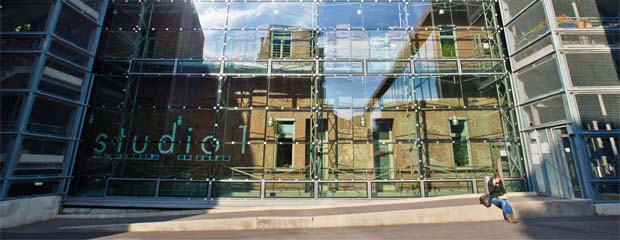
Students use professional audio, video and lighting equipment in the Media Centre to create film projects, audiovisual installations and presentations. The Media·Point provides the technical infrastructure for media projects of various formats and scales and supports students in the practical realisation of their projects. A cinema room with around 50 seats provides space for screenings and project-related events.

Studio work

Media·Point offers a video studio of approximately 100 square metres with movable backdrops and flexible recording areas, a live control room and several camera tracks. The studio is suitable for both live productions in front of an audience and for presentations and recorded formats. Seating creates space for screenings. The available equipment can be used for panel discussions with guests, blue- and green-screen recordings, and artistic projects. Even choir recordings are easily possible thanks to the excellent acoustics. A voice-over booth is available for post-recording.

Post-production and software

Eight individually accessible editing suites are available for post-production. Access to the editing suites is available around the clock.

The following facilities are available in the editing suites, amongst others:

  • 8 separate editing suites in a quiet environment
  • equipped with Windows workstations
  •  Video editing with software from Adobe and Blackmagic Design
  • Editing of HD, Ultra HD/4K and 3D video
  • Audio editing using software from Avid and Cockos
  • Audio production in 5.1 format
  • Effects and image editing using software from Adobe and Affinity

Equipment lending 

Students can lend extensive equipment for their projects.
The following items, amongst others, are available for loan:

  • Video equipment
  • Audio equipment
  • Lighting equipment
  • Mobile recording and lighting systems

Work within the academic context

At the Media Centre, students develop media-based projects from recording through to the final presentation. They plan shoots, coordinate technical equipment, edit footage and design sound and image processes independently.
Media·Point supports both independent artistic work and study-related projects that focus on audiovisual media.

Services

Media·Point organises the loan of equipment, coordinates the use of studios and editing suites, and supports students in preparing larger productions. The staff advises on equipment selection and assists with technical queries during production.

Technical support

The technical staff, Frank Thomas, a graduate engineer (FH) in Electrical Engineering, and Jean-Claude Schwab, a qualified Media Technician, support the students’ work. They advise on technical implementation, assist with the planning of complex productions and ensure the safe handling of technology and equipment. 
 

» Organisational matters for students

  • Theses Archives
  • CAD, CAM, CNC
  • Printing
  • Photo
  • Plaster and mould construction
  • Wood
  • Synthetic materials
  • MAIA
  • Media·Point in the Media Centre
    • Organizational matters for students
  • Metal
  • Modelling
  • Video

Contact

Dipl.-Ing. (FH) Frank Thomas
Technical staff member

Media·Point in the Media Centre
Steubenstraße 6a, room 104

phone: +49 (0) 36 43 / 58 36 53
fax: +49 (0) 36 43 / 58 36 51
e-mail: frank.thomas[at]uni-weimar.de

Jean-Claude Schwab
Technical staff member

Media·Point in the Media Centre
Steubenstraße 6a, room 102

phone: +49 (0) 36 43 / 58 36 50
fax: +49 (0) 36 43 / 58 36 51
e--ail: jean-claude.schwab[at]uni-weimar.de

» Organisational matters for students

Downloads

» Download the map of the workshops

» Notes on Bauhaus.Modules (only available in English)

  • Official Instagram account of the Bauhaus-Universität Weimar
  • Official LinkedIn account of the Bauhaus-Universität Weimar
  • Official Vimeo channel of the Bauhaus-Universität Weimar
  • The Bauhaus-Universität Weimar uses Matomo for web analytics.
  • Print
  • Send by e-mail
  • Feedback this Page
  • Studies

    • Academic Programmes
    • Advising
    • Discover the university
    • Application
    • New Students
    • Course Catalogue
  • Information

    • Alumni
    • Employees
    • Researchers
    • Visitors and Guests
    • Academic Staff
    • Emergency Information
    • Press and Media
    • Doctoral candidates
    • Students
    • Businesses
  • Services

    • Message Boards
    • Campus Maps
    • Sitemap
    • Media Service
    • Data Protection Policy
    • Accessibility Statement
    • Legal Notice
  • Contact

    • Contact form
  • Contact
  • Data protection policy
  • Accessibility Statement
  • Legal Notice
  • Sitemap
  • Internal
  • TYPO3
  • The Bauhaus-Universität Weimar uses Matomo for web analytics.
© 1994-2026 Bauhaus-Universität Weimar
  • Contact
  • Data protection policy
  • Accessibility Statement
  • Legal Notice
  • Sitemap
  • Internal
  • TYPO3

Accessibility panel

Simple language

Information about the Bauhaus-Universität Weimar in German.

Set contrast Read more about this setting

Changes from color to monochrome mode

contrast active

contrast not active

Darkmode for the lightsensitive Read more about this setting

Changes the background color from white to black

Darkmode active

Darkmode not active

Click- and Focus-feedback Read more about this setting

Elements in focus are visually enhanced by an black underlay, while the font is whitened

Feedback active

Feedback not active

Animations on this Website Read more about this setting

Halts animations on the page

Animations active

Animations not active